
Thread
What is Thread?
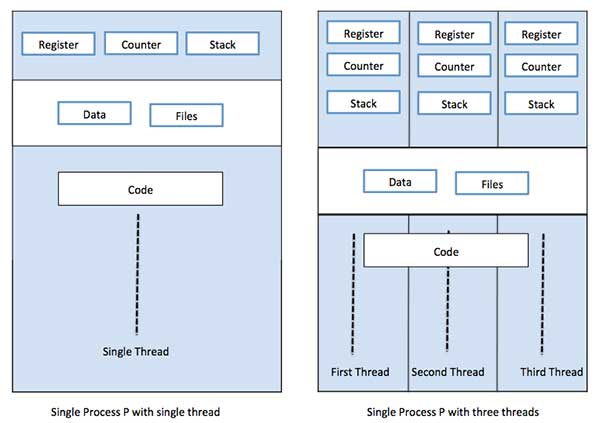
A thread is a flow of execution through the process code, with its own program counter that keeps track of which instruction to execute next, system registers which hold its current working variables, and a stack which contains the execution history.
A thread shares with its peer threads few information like code segment, data segment and open files. When one thread alters a code segment memory item, all other threads see that.
A thread is also called a lightweight process. Threads provide a way to improve application performance through parallelism. Threads represent a software approach to improving performance of operating system by reducing the overhead thread is equivalent to a classical process.
Each thread belongs to exactly one process and no thread can exist outside a process. Each thread represents a separate flow of control. Threads have been successfully used in implementing network servers and web server. They also provide a suitable foundation for parallel execution of applications on shared memory multiprocessors. The following figure shows the working of a single-threaded and a multi threaded process.
Difference between Process and Thread
| S.N. | Process | Thread |
|---|---|---|
| 1 | Process is heavy weight or resource intensive. | Thread is light weight, taking lesser resources than a process. |
| 2 | Process switching needs interaction with operating system. | Thread switching does not need to interact with operating system. |
| 3 | In multiple processing environments, each process executes the same code but has its own memory and file resources. | All threads can share same set of open files, child processes. |
| 4 | If one process is blocked, then no other process can execute until the first process is unblocked. | While one thread is blocked and waiting, a second thread in the same task can run. |
| 5 | Multiple processes without using threads use more resources. | Multiple threaded processes use fewer resources. |
| 6 | In multiple processes each process operates independently of the others. | One thread can read, write or change another thread's data. |
Advantages of Thread
- Threads minimise the context switching time.
- Use of threads provides concurrency within a process.
- Efficient communication.
- It is more economical to create and context switch threads.
- Threads allow utilisation of multiprocessor architectures to a greater scale and efficiency.
Types of Thread
Threads are implemented in following two ways −
User Level Threads − User managed threads.
Kernel Level Threads − Operating System managed threads acting on kernel, an operating system core.
User Level Threads
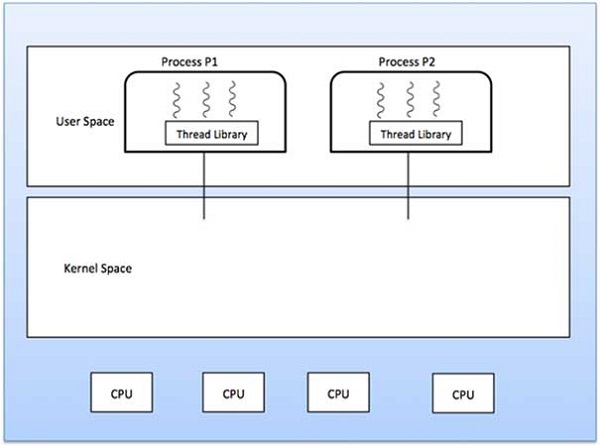
In this case, the thread management kernel is not aware of the existence of threads. The thread library contains code for creating and destroying threads, for passing message and data between threads, for scheduling thread execution and for saving and restoring thread contexts. The application starts with a single thread.
Advantages
- Thread switching does not require Kernel mode privileges.
- User level thread can run on any operating system.
- Scheduling can be application specific in the user level thread.
- User level threads are fast to create and manage.
Disadvantages
- In a typical operating system, most system calls are blocking.
- Multi threaded application cannot take advantage of multiprocessing.
Kernel Level Threads
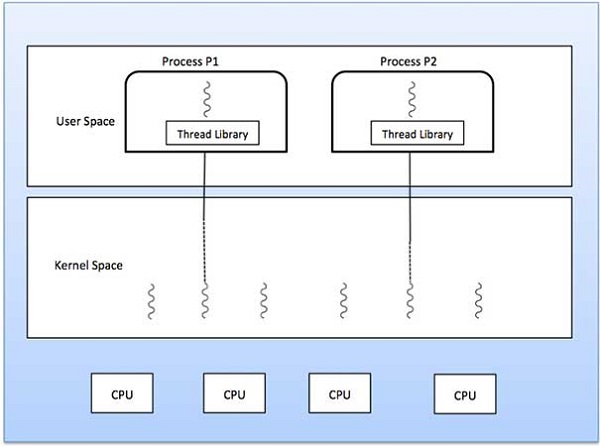
In this case, thread management is done by the Kernel. There is no thread management code in the application area. Kernel threads are supported directly by the operating system. Any application can be programmed to be multi threaded. All of the threads within an application are supported within a single process.
The Kernel maintains context information for the process as a whole and for individuals threads within the process. Scheduling by the Kernel is done on a thread basis. The Kernel performs thread creation, scheduling and management in Kernel space. Kernel threads are generally slower to create and manage than the user threads.
Advantages
- Kernel can simultaneously schedule multiple threads from the same process on multiple processes.
- If one thread in a process is blocked, the Kernel can schedule another thread of the same process.
- Kernel routines themselves can be multi threaded.
Disadvantages
- Kernel threads are generally slower to create and manage than the user threads.
- Transfer of control from one thread to another within the same process requires a mode switch to the Kernel.
Multi threading Models
Some operating system provide a combined user level thread and Kernel level thread facility. Solaris is a good example of this combined approach. In a combined system, multiple threads within the same application can run in parallel on multiple processors and a blocking system call need not block the entire process. Multi threading models are three types
- Many to many relationship.
- Many to one relationship.
- One to one relationship.
Many to Many Model
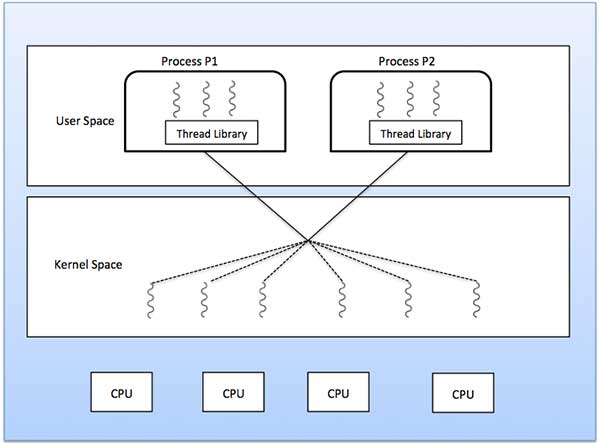
The many-to-many model multiplexes any number of user threads onto an equal or smaller number of kernel threads.
The following diagram shows the many-to-many threading model where 6 user level threads are multiplexing with 6 kernel level threads. In this model, developers can create as many user threads as necessary and the corresponding Kernel threads can run in parallel on a multiprocessor machine. This model provides the best accuracy on concurrency and when a thread performs a blocking system call, the kernel can schedule another thread for execution.
Many to One Model
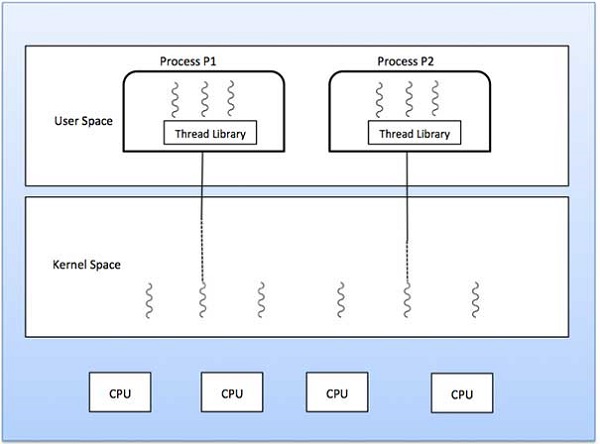
Many-to-one model maps many user level threads to one Kernel-level thread. Thread management is done in user space by the thread library. When thread makes a blocking system call, the entire process will be blocked. Only one thread can access the Kernel at a time, so multiple threads are unable to run in parallel on multiprocessors.
If the user-level thread libraries are implemented in the operating system in such a way that the system does not support them, then the Kernel threads use the many-to-one relationship modes.
One to One Model
There is one-to-one relationship of user-level thread to the kernel-level thread. This model provides more concurrency than the many-to-one model. It also allows another thread to run when a thread makes a blocking system call. It supports multiple threads to execute in parallel on microprocessors.
Disadvantage of this model is that creating user thread requires the corresponding Kernel thread. OS/2, windows NT and windows 2000 use one to one relationship model.
Difference between User-Level & Kernel-Level Thread
| S.N. | User-Level Threads | Kernel-Level Thread |
|---|---|---|
| 1 | User-level threads are faster to create and manage. | Kernel-level threads are slower to create and manage. |
| 2 | Implementation is by a thread library at the user level. | Operating system supports creation of Kernel threads. |
| 3 | User-level thread is generic and can run on any operating system. | Kernel-level thread is specific to the operating system. |
| 4 | Multi-threaded applications cannot take advantage of multiprocessing. | Kernel routines themselves can be multi threaded. |


Comments
Post a Comment