
Multi Level Queue Scheduling (MLQ)


Multi Level Queue Scheduling (MLQ)

·         Multilevel queue scheduling classifies the processes according to their types for example, a multilevel queue scheduling algorithm makes a common.

·         In this scheduling ready queue is divided into various queue that are called sub queues. A subqueue is a distinct operational queue

·         The process are permanently assigned to subqueues, generally based on some property of the process such as memory size,priority or process type

·         Each subqueue has its process sucheduling algorithm. For example interactive process at the foreground may use round robin scheduling while batch jobs at the background may use the FCFS method

·         For example, consider a system with four different queues

1.       System processes

2.       Interactive processes

3.       End-user processes

4.       Interactive processes

·         In this example, each queue has absolute priority absolute over low priority queues. No process in a batch queue could run unless the queue for system process and interactive processes were all empty.

·         If an interactive process entered the ready queue while a batch process was running the batch process would be preempted. For example,solaries 2 operating system uses this form of algorithm

Example Problem : 
Consider below table of four processes under Multilevel queue scheduling.Queue number denotes the queue of the process. 
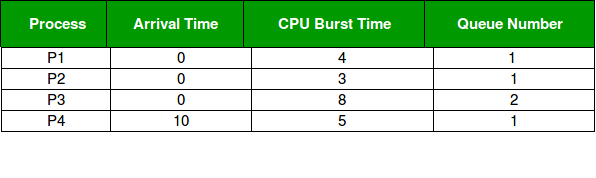
 

Priority of queue 1 is greater than queue 2. queue 1 uses Round Robin (Time Quantum = 2) and queue 2 uses FCFS. 

Below is the gantt chart of the problem : 



At starting both queues have process so process in queue 1 (P1, P2) runs first (because of higher priority) in the round robin fashion and completes after 7 units then process in queue 2 (P3) starts running (as there is no process in queue 1) but while it is running P4 comes in queue 1 and interrupts P3 and start running for 5 second and after its completion P3 takes the CPU and completes its execution. 

Advantages:

  • The processes are permanently assigned to the queue, so it has advantage of low scheduling overhead.

Disadvantages:

  • Some processes may starve for CPU if some higher priority queues are never becoming empty.
  • It is inflexible in nature.


Comments

Popular posts from this blog

Defination of OS(operating system) and its concepts

    What do you mean by operating system?     Definition :  An operating system is a program that act as an interface between the user of a computer and the                                      Computer hardware. Operating system is a first program that gets loaded into the memory through a process called booting. Concepts of operating system : ·                       The purpose of operating system is to provide an environment in which a user can execute program in a convenient and efficient manner. ·                       Operating system is an integrated set of program that ma...

Multi user Operating System

  Multi user operating system ·           In a multi-user operating system, multiple number of user can access different resources of a computer at a same time. ·           The access is provided using a network that consists of various personal computer attached to a mainframe computer system.                                                              diagram of multi -user operating system       ·           The various personal computer can send and receive information to mainframe computer system. ·           The example    of multi-user OS are UNIX, windows 2000,novell netware.            sing...

Batch Processing Operating System

  Batch processing system ·           Batch processing is one of the oldest method    of running the programs ·           The computer in the past were very large in size and their I/O devices were very different from those that are used today. The job processing was not interactive as it is today. ·           The user did not interact directly with computer system.   ·           The process scheduling , memory management, file management and I/Omanagement functions are quite simple in batch processing system   1.         Process scheduling (i.e. allocation strategy for a processor is typically in order of their arrival i.e. first come first served(FCFS)basis.   2.         Memory management  is done by divi...

Scheduler

  Scheduler   Scheduling Objectives Here, are important objectives of Process scheduling Maximize the number of interactive users within acceptable response times. Achieve a balance between response and utilization. Avoid indefinite postponement and enforce priorities. It also should give reference to the processes holding the key resources  Process Scheduling handles the selection of a process for the processor on the basis of a scheduling algorithm and also the removal of a process from the processor. It is an important part of multiprogramming in operating system. Process scheduling involves short-term scheduling, medium-term scheduling and long-term scheduling. Details about these are given as follows − Long-Term Scheduling Long-term scheduling involves selecting the processes from the storage pool in the secondary memory and loading them into the ready queue in the main memory for execution. This is handled by the long-term scheduler or job scheduler. The long-term s...

Time Sharing System and its Requirements

  Time sharing  system ·           Time sharing refers to the allocation of computer resources in a time dependent fashion to several program simultaneously ·           A time sharing system has many user terminals that are connected to same computer simultaneously. Using these terminal, different users can work on a system at the same time ·           Thus, it uses multi programming with a special CPU scheduling among all the last one, and then again beginning from the first one ·           In time sharing system, the CPU time is divided among all the users on schedule basis. ·           It release the CPU under any of the following three conditions: 1.         When the allotted time slice expires. 2.    ...